Every icon on the grid is an object, and every object is one of a small number of kinds. This chapter introduces each kind, explains where Gridtop keeps it, and shows how to create one. Later chapters take each kind in depth.
To create an object, right-click an empty cell, choose Create New..., and then the kind of object. It appears in that cell, and its descriptor panel opens with the name selected, ready for a better one.
A Role, Skill, Task or Tool opens its settings window instead, with its Name selected. Type a name and press ENTER, or click Sv (Save), to save it in Agentic Matrix/Assets. These four have no descriptor panel; they appear on their agents' INSTR tab (3.5).
The Create New... menu offers, in order:
Inside a Blueprint, the menu offers three more: Target, Solution and Business Model (17.4).
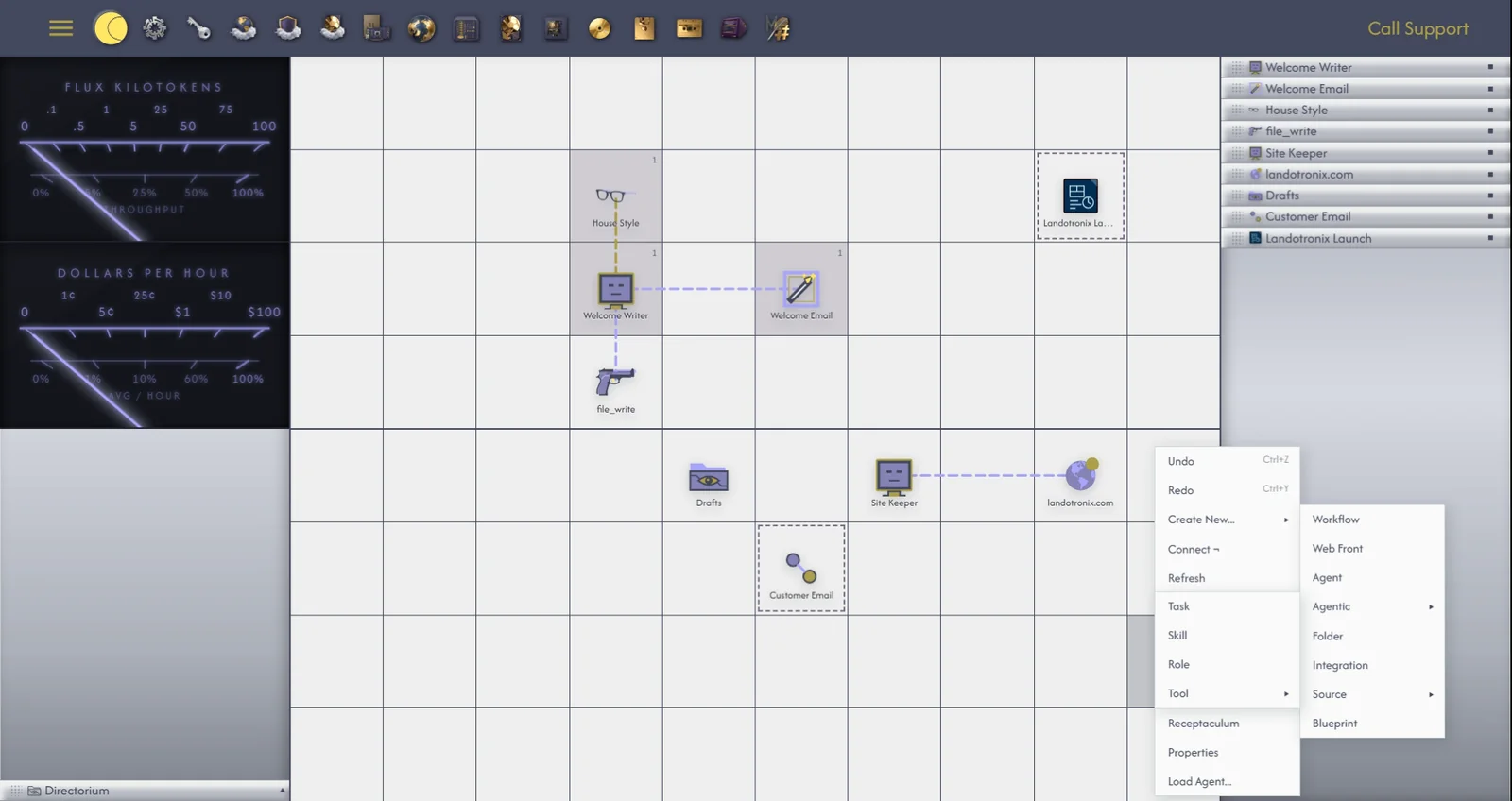
Agent. An assistant powered by an AI model, which you direct in its chatbox and which can act on your behalf with Gridtop's tools. (Chapters 11 to 19.)
Task. A standing piece of work, written down once: what is to be done, with any files it needs, and how many steps an agent may take to do it. A connected agent is told about it every time it works. (16.1.)
Skill. Know-how, written as instructions, that an agent draws on when a piece of work calls for it: how your business writes its invoices, say, or how your website's pages are laid out. (16.2.)
Role. Who an agent is: its model and tuning, the Tasks, Skills and Tools it carries, and the authority it has. A Role gives several agents the same character, or swaps an agent from one character to another. (16.3.)
Tool. A capability an agent can use, such as reading a file, publishing a page or querying a database. Gridtop's own tools live in the Tools library; you can copy one to adjust, or start one of your own. (16.4 and 16.5.)
Workflow. A container whose inside is a grid of its own, gathering the agents and objects of one piece of work in one place. (Chapter 17.)
Blueprint. A planning layout for a venture: its target, its solution and its business model, as objects you can connect and hand to agents. (17.4.)
Source. A source of computing power for your agents.
Integration. A connection to another service, such as an MCP server, Zapier, GitHub or Google Analytics, placed on the grid or attached to one of your websites. (Chapter 32.)
Folder. A folder on your drive. Double-click it, and the grid shows what is inside. (Chapter 8.)
Web Front. One of your websites, as your hosting knows it: its folder, its domains, its databases. (Chapter 26.)
Most objects are files on your drive, kept under A:/Agentic Matrix/Gridtop/:
| Object | Kept as |
|---|---|
| Agent | A folder named for the agent, holding a file ending .agent |
| Task | A file ending .task |
| Skill | A file ending .skll |
| Role | A file ending .role |
| Tool | A file ending .tool |
Blueprints are kept in A:/Agentic Matrix/Blueprints, and a website's staged versions in A:/Agentic Matrix/Projects/ its domain /Staging (26.6).
The remaining objects are shortcuts to things that exist elsewhere: a Folder is a real folder on your drive; a Web Front is your website on your hosting; a Workflow and its layout are kept as part of your saved Gridtop (chapter 36).
If you create two objects with the same name in the same place, Gridtop keeps both by numbering the second: Welcome Writer_2.
Rename an object in the header of its descriptor panel (5.2); a file or folder behind it is renamed to match. A Role, Skill, Task or Tool is renamed in its settings window, in its Name field.